

The VMware Admin’s Honest Guide to Hyper-V What’s Better, What’s Different, and What to Watch Out For
If you have been managing VMware for years, you have probably had the Hyper-V conversation more than once by now. And you have probably pushed back on it.
That is understandable. You know vSphere. You know where everything lives in vCenter. Switching platforms feels like giving up years of expertise. But the VMware you built your skills on is not the same product you are paying for today. Broadcom made sure of that.
This is a straight comparison written for people who actually manage these environments.
Why Admins Are Seriously Looking at This Now
Broadcom’s changes hit the VMware ecosystem hard. The VCSP partner program was shut down for most providers. The product catalog shrank from around 168 bundles to just 4. Minimum purchase requirements jumped to 72 cores. Late renewals now carry a 20 to 25 percent penalty.
For many organizations, the cost no longer makes sense. And for admins, it is not just a budget problem. If the platform you specialize in is being priced out of reach for a large part of the market, that is worth paying attention to from a career standpoint too.
The Terminology Map
The biggest mental block when moving to Hyper-V is the vocabulary. The concepts are the same, the names are just different.
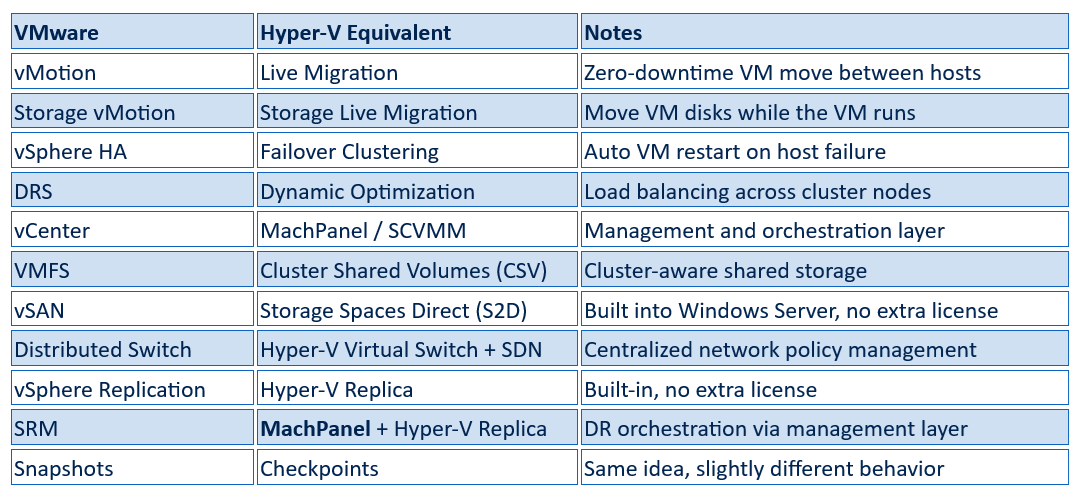 Once this clicks, Hyper-V stops feeling foreign. You are not learning new concepts, just new names for familiar ones.
Where Hyper-V Has a Real Edge
Licensing is cleaner and cheaper: Microsoft’s own documentation states that “Hyper-V is included with Windows Server and Windows, eliminating additional hypervisor licensing costs” and that the Datacenter edition provides unlimited virtual machine rights (Microsoft Learn). There is no equivalent of stacking vSAN, vSphere Replication, and vCenter licenses on top of your base license. For organizations managing dozens of hosts, this difference adds up fast.
Replication without the complexity: According to Microsoft’s official documentation, Hyper-V Replica “does not require a failover cluster or any shared storage” and works over a standard IP connection between sites (Microsoft Learn). VMware’s equivalent either needs SRM, which is expensive and complex, or storage hardware that supports array-based replication. Hyper-V Replica handles the common DR use case with far less overhead.
Serious scalability built in: With Windows Server 2025, Microsoft has pushed Hyper-V to support up to 4 petabytes of memory and 2,048 logical processors per host, along with up to 240 TB of memory and 2,048 virtual processors per VM (Microsoft Learn). These are not numbers any typical on-premises VMware deployment will bump into.
Better fit for Windows environments: If most of your VMs run Windows, Hyper-V and the guest OS come from the same vendor. Backup, VSS, and live migration work more consistently out of the box. Active Directory integration is native, which matters in organizations running a Microsoft-heavy stack.
Azure runs on it: Microsoft runs its entire cloud platform on Hyper-V. The features available in Windows Server Hyper-V are tested at a scale that most on-premises VMware deployments will never approach.
Where It Works Differently
The management interface: vCenter is polished and purpose-built for large environments. Hyper-V Manager, the default Windows tool, is basic and does not scale. This is where most evaluation mistakes happen. Teams look at Hyper-V Manager, decide it is not enterprise-ready, and stop there. The right comparison is Hyper-V paired with a proper management layer like MachPanel, which gives you multi-host visibility, cluster management, tenant isolation, VM lifecycle automation, SDN, billing, and self-service portals. Judging Hyper-V by Hyper-V Manager is like judging VMware by the standalone host client.
Checkpoints vs snapshots: Both do the same job but behave differently. VMware uses block-level delta files. Hyper-V offers standard checkpoints, which work similarly, and production checkpoints, which use VSS to capture an application-consistent state. Production checkpoints are actually better for application consistency, though the terminology takes some getting used to. On both platforms, checkpoints are not a substitute for proper backups.
Networking needs planning upfront: VMware’s Distributed Switch handles centralized networking across all hosts automatically. Hyper-V’s default virtual switch is per-host, which can lead to VLAN mismatches between nodes after a live migration. The fix is Hyper-V SDN managed through MachPanel, which gives you the same centralized control. Set this up before you start migrating workloads, not after. For a closer look at how this works, see Building Modern Cloud Infrastructure with Hyper-V and Network Automation.
Linux support is good, not perfect. Common distributions like Ubuntu, RHEL, and Debian run well on Hyper-V. Older or less common distributions can have rough edges. Test your Linux workloads in a pilot before moving them to production.
Where You Will Hit Friction
The learning curve: Expect a few weeks before your team is comfortable. Some things will take longer to troubleshoot simply because the experience is new. Plan for this rather than being caught off guard by it.
Third-party tools: Backup software, monitoring agents, and management utilities may have Hyper-V support that is less mature than their VMware equivalent. Veeam handles Hyper-V well. Other vendors vary. Check your full tooling stack before you migrate, not after.
Skills and hiring: VMware certifications do not transfer directly and the Hyper-V specialist talent pool is smaller, though that is changing as more organizations shift platforms. If your team depends on the external hiring market, factor this into your planning timeline.
How to Approach the Migration
Set up MachPanel before you move a single VM. The most common mistake is migrating workloads first and then trying to layer in the management platform afterward. Get MachPanel running, configure your network templates, set up your storage pools, and then migrate VMs into an environment that is already ready and managed.
Start with non-production workloads and run them for 30 to 60 days. Migrate in waves after that. Each wave gets faster. Document the differences your team finds along the way and build a runbook specific to your environment. This is how you build team knowledge that lasts beyond any individual person.
The Bottom Line
Hyper-V is not VMware and it is not trying to be. For most IT teams though, it handles real workloads well, the licensing is predictable, and the total cost is lower. VMware’s strengths around UI polish and ecosystem maturity are real. So is what Broadcom is now charging for access to them.
The objection that Hyper-V is not enterprise-grade has not held up for a while now. Microsoft’s ongoing investment in Windows Server 2025 capabilities, from GPU partitioning to expanded scalability limits, makes clear that this is not a platform being wound down. If you are a VMware admin who has been putting off a proper evaluation, 2026 is a reasonable time to actually run one.
Related Reading:
- Why Hyper-V Is Becoming a Serious Alternative
- Hyper-V for Service Providers: Build a Profitable VPS Cloud
- Building Modern Cloud Infrastructure with Hyper-V and Network Automation
Thinking About Making the Move?
Whether you are still evaluating your options or already have a migration timeline in mind, getting the orchestration layer right from the start makes all the difference. Our Hyper-V experts at MachSol have helped teams of all sizes plan and execute migrations from VMware, set up MachPanel for multi-tenant environments, and build infrastructure that actually scales without surprise costs.
If you want to talk through your specific setup, your workloads, or what a realistic migration plan looks like for your organization, we are happy to have that conversation.